
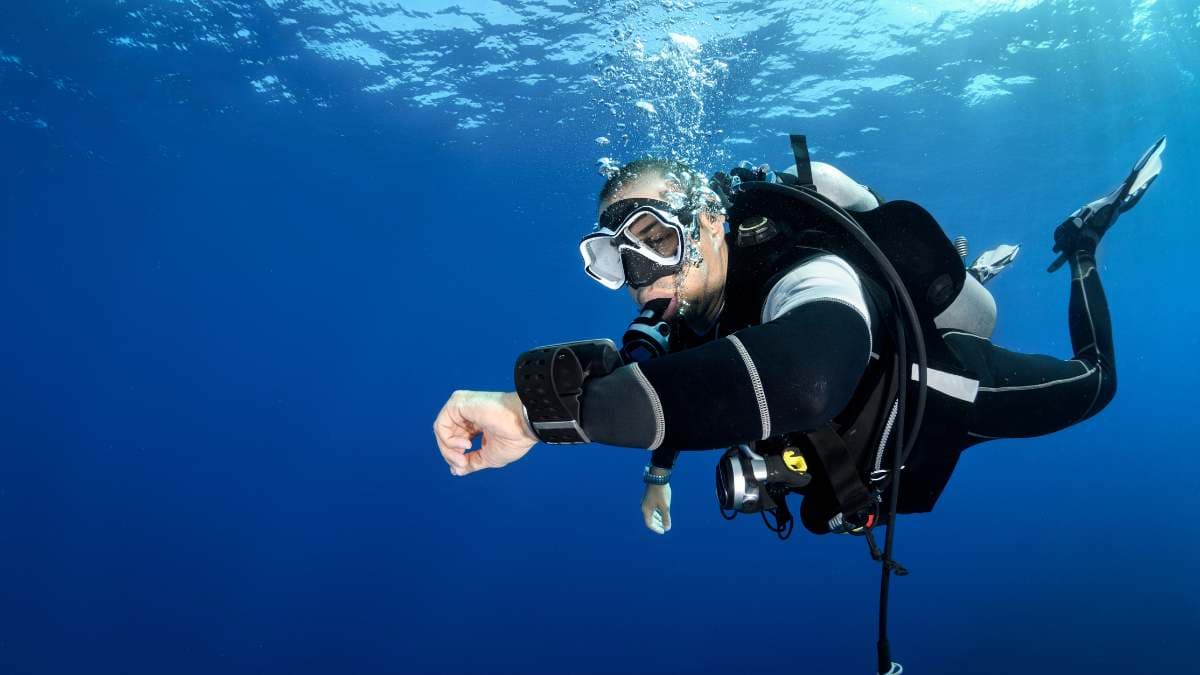
What a dive computer does
A dive computer monitors your depth and time underwater. It uses a decompression algorithm to calculate the nitrogen absorbed in your body tissues from your dive profile.
Its main output is your "No Decompression Limit" (NDL): the time you can stay at your current depth without needing decompression stops on the way up. Because it works in real time, a computer has replaced the old plastic dive tables and allows "multi-level" diving, where you get credit for moving to shallower depths and extend your bottom time within its limits.
Owning your own computer, instead of renting, lets you take ownership of your underwater profile.
Features a beginner needs
Do not get distracted by features meant for technical divers or commercial professionals. Focus on these:
- Readability. You must be able to read it in low visibility or on a night dive. Look for a high-contrast screen and a strong backlight. Colour LED or AMOLED screens are easy to read but may have shorter battery lives.
- A simple interface. Underwater you don't want to be fumbling through menus. The best beginner computers usually have one or two buttons that are easy to use even in thick neoprene gloves.
- Nitrox compatibility. Even if you aren't nitrox certified yet, you likely will be soon. Make sure you can adjust the oxygen percentage (FO2) between 21% and 40%.
- Safety alarms. Audible and visual alarms for rapid ascent rates, NDL warnings and deep stops are vital for new divers who are still mastering buoyancy control.
- A logbook. Most computers store your dive history. Look for Bluetooth to your smartphone or PC, so you can digitise your logs and share them.
Wrist or console?
Wrist-mounted computers are the most popular choice. They are worn like a watch, easy to check at a glance, and independent of your regulator, so they are easy to travel with and can stay in your carry-on. Many are small enough to wear every day.
Console computers are built into your pressure gauge (SPG) on the high-pressure hose. All your data, depth, time and air pressure, sits in one place. But consoles are bulkier, and if the computer fails you may have to send your whole regulator setup in for service.
Air integration: skip it at first
Air integration (AI) shows your tank pressure, either through a hose (console) or a wireless transmitter that screws into your regulator's first stage. Generally the best dive computers for beginners are not integrated. If you have the budget and want the convenience, go for it, but it adds a lot of hassle for new divers. Keep it simple.
For a first computer, AI is a nice-to-have rather than a must-have. It simplifies your gear and gives a "Time Remaining" estimate based on your actual breathing rate. But wireless transmitters add significantly to the price and need an extra battery. If you are on a budget, start with a high-quality non-integrated wrist unit.
Choose a conservative algorithm
Different brands use different mathematical models (algorithms) to calculate safety. Some, like the Suunto RGBM, are known for being more "conservative": they may give you slightly less bottom time but put a higher priority on safety margins. Others, like the Bühlmann ZHL-16C used by Shearwater and Garmin, allow more customisation.
As a beginner, a conservative algorithm is generally a good thing. Dive your own computer and keep it on conservative: computers differ, so do not use your buddy's computer for your own limits.
Battery: change it or charge it yourself
Some entry-level models use standard CR2450 batteries that you can change yourself in five minutes. Others recharge by USB, like a smartphone. If a unit needs a factory battery change, factor in the cost and the downtime while it is at the service centre. For travellers, a user-changeable battery or a USB-rechargeable unit is almost always the better choice.
What to spend
Dive computers fall into three price tiers, with prices as of February 2026.
| Tier | Price | What you get |
|---|---|---|
| Entry level | $250–$450 | Rugged, reliable, and everything a recreational diver needs. Examples: the Mares Puck Pro, the Aqua Lung i300C |
| Mid-range | $500–$850 | Better screens, Bluetooth and often watch-style designs that look good topside. Examples: the Suunto D5, the Garmin Descent G1 |
| High-end | $900+ | Full colour screens, air integration and advanced features for trimix or closed-circuit rebreather diving. Often overkill for a first purchase unless you have a high budget and plan to go pro immediately |
Try them on before you buy
The best dive computer is the one you can afford, understand and read clearly underwater. Visit a dive centre, strap a few to your wrist and see which menu system feels most logical to you.
This device is your primary safety tool. Choose a reputable brand with a good warranty, and it will serve you well for hundreds of dives. It also earns a place on your dive packing list.
Questions
What is the best dive computer for a beginner?
The one you can afford, understand and read clearly underwater. For most beginners that is a reliable wrist-mounted unit without air integration, with a conservative algorithm and nitrox compatibility.
Do I need air integration on my first dive computer?
No. Air integration is a nice-to-have rather than a must-have. It simplifies your gear and shows a "Time Remaining" estimate, but wireless transmitters add significantly to the price and need an extra battery.
What is NDL on a dive computer?
NDL is the "No Decompression Limit": the time you can stay at your current depth without needing decompression stops on your ascent.